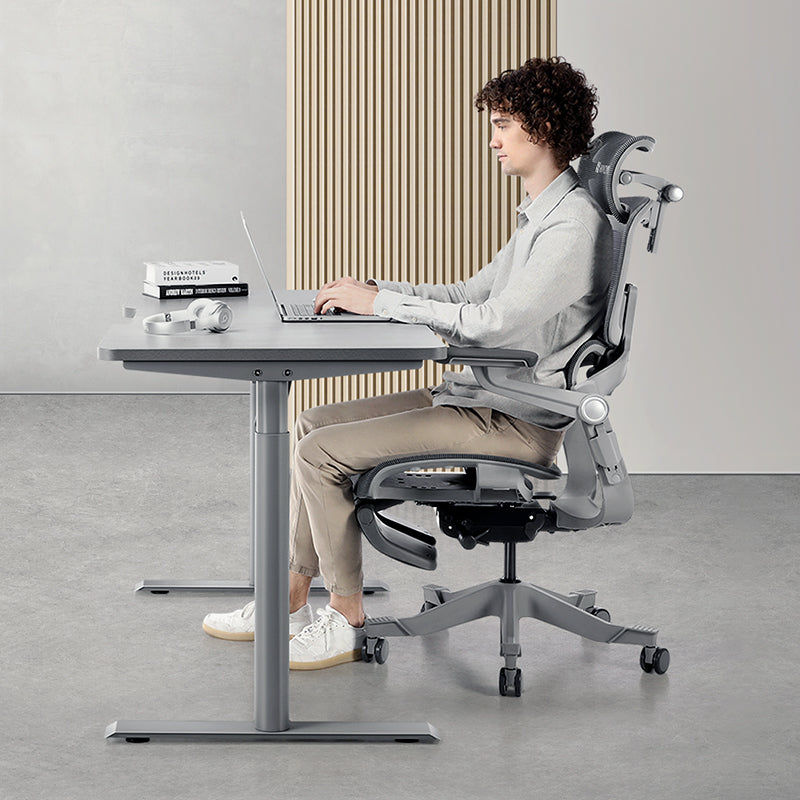


If your lower back starts nagging by mid-afternoon, check three things in this order: seat height and depth, then lumbar support, then how long you've been sitting still. Desk-related back ache often builds from a few small mismatches over a long day rather than one bad setting, so working through them in sequence makes more sense than turning every knob at once.
You don't need new equipment to start. Most of this works on the chair you already own.
Why does your lower back ache after a long day at the desk?
Picture a typical Tuesday. You sit down at 9am feeling fresh, but the seat's a little too deep, so you perch on the front half to reach the keyboard. By the third video call your pelvis has rolled backwards, your shoulders have crept forward and your lower back is holding up weight the chair should be carrying. By 6pm, you feel it.
That's why a new chair won't sort things out by itself. If your setup habits stay the same, the mismatch moves onto the new seat with you.
Singapore's Health Promotion Board lists sitting, standing or bending for long periods among common risk factors on its HealthHub low back pain page. It also notes there isn't one "correct" posture. What counts is a setup that supports you, and moving within it.
Five setup checks to try, in order
This isn't a ranking of what causes back pain. It's simply a sensible order for troubleshooting, starting with the base and working up:
- Seat depth mismatch. Too deep or too shallow for your thighs, so your back never settles against the backrest.
- Lumbar support in the wrong place. It sits above or below the curve of your lower back, or presses too hard.
- Hours without a position change. Long, unbroken blocks load the same tissues all afternoon.
- Armrests that don't reach you. Set too low or too far out, they leave your trunk leaning in to compensate.
- A desk and screen out of step with the chair. A high desk or a distant monitor pulls you forward, away from the lumbar support.

Start with the seat, not the lumbar knob
Everything above your hips depends on the base, so that's where you start.
- Raise or lower the seat until your feet rest flat and your thighs are roughly level, knees at or just below hip height. If your feet can't reach the floor at the right desk height, add a footrest instead of dropping the seat.
- Sit all the way back so your pelvis touches the backrest.
- Slide the seat depth until you can fit two to three fingers between the front edge and the back of your knees.
Most people skip this step and go straight for the lumbar adjustment, which can't do much if your back isn't touching the backrest. If you're on the shorter side, a seat that's too deep is the usual reason you end up perching.
Then lumbar height, and only then depth
Do height first. Change both at once and you'll probably overcorrect.
- Height: move the support up or down until it meets the inward curve of your lower back, roughly at belt level. It shouldn't dig into your mid-back or sit below your waist.
- Depth: start at the shallowest setting and increase gradually until you feel steady, even contact. Stop before you're being pushed forward.
- Test it moving: sit upright, lean back slightly, then come forward again. Contact should feel similar in all three positions.
Watch out for one habit. It's tempting to crank the depth up because more support must be better, but too much depth makes your spine work around the pad instead of resting against it. Stacking cushions behind you does the same. Our guides to common ergonomic chair mistakes and why lumbar support matters go into more detail.
How often should you change position?
A good setup's only a starting point. Movement is what stops it falling apart by 4pm.
A practical rule is to shift position briefly every 30 to 60 minutes. HealthHub's self-help tips for managing pain suggest changing your posture every 30 minutes and taking frequent breaks. You don't need a formal routine. Small swaps work:
- Recline lightly while you read a pull request or board report, then come upright to type.
- Take the next one-to-one standing, or walk to refill your water bottle between calls.
- On a sit-stand desk, stand for part of the weekly team sync.
Is a 30-minute timer irritating in the middle of a debugging session? Probably. Tie your movement to natural breaks instead: the end of a call, a test suite running, a model refreshing in Excel. Our piece on how often you should stand up has more ideas for fitting this into a focused day.
Where to start checking
Use this as a troubleshooting guide, not a diagnosis. The same ache can have different causes, and when it shows up doesn't tell you for certain which setting is off.
| What you notice | Worth checking | Try first |
|---|---|---|
| Fine in the morning, aching by late afternoon | Long stretches in one position, or posture drifting through the day | Add movement breaks; recheck seat depth at lunchtime |
| Ache starts within the first hour | Seat depth and lumbar position | Seat depth, then lumbar height |
| Discomfort mainly when reclining | Whether lumbar contact stays as you lean back | Lumbar depth and recline tension |
| Worse during heavy typing | How far you lean in to reach the keyboard | Armrest height and keyboard distance |
It's a setup checklist, not a diagnosis. Quick test: type normally for a minute. Do you drift forward, away from the backrest? If so, recheck seat depth and lumbar height first.
Your desk is part of the picture
A desk that's too high lifts your shoulders and tips your trunk forward. Too low, and you round over it and lose the lumbar contact you've just set up. Set the chair first, then bring the desk to elbow height, with the keyboard and mouse close enough that your elbows stay by your sides.
What about detailed work that keeps pulling you towards the screen, like reconciling a 40-column spreadsheet or reviewing code line by line? Move the monitor closer or bump up the text size rather than leaning in. A height-adjustable desk such as the Hinomi S1 standing desk makes elbow height easier to hit and adds standing time too.
What makes this more likely in a Singapore workday?
A few local patterns are worth planning around.
- Hybrid weeks mean two setups. Plenty of people split the week between an office hot desk and a corner of an HDB flat or condo. A dining chair at the dining table gives you no seat depth or lumbar adjustment at all. In the office, reset a shared chair before you start; the last person's settings rarely suit you.
- Long days in one block. When work runs into the evening, the late-afternoon slump is when support fades. Schedule position changes rather than waiting for the ache.
- Commuting adds sitting time. A seated MRT ride at both ends of a desk day adds up. Standing for part of it, or walking one stop, breaks it up.
Singapore's Physical Activity Guidelines, from the Health Promotion Board and Sport Singapore, encourage adults to cut down sedentary time. Breaking up sitting blocks at work is an easy start.
When to see a doctor or physiotherapist
This guide covers your workstation; it can't diagnose anything. HealthHub notes that most low back pain improves within about six weeks with self-management, but please see a doctor or physiotherapist if your pain isn't settling, keeps coming back, spreads down a leg, or comes with numbness, tingling or weakness. A physiotherapist can also look at how you sit and suggest exercises that suit you.
Does a new chair make sense?
Not always. It's worth considering when your current chair has no seat depth adjustment, no adjustable lumbar support, or doesn't fit your height. Here's how the Hinomi range lines up for lower back support:
| Chair | Height fit / max weight | What it offers your lower back |
|---|---|---|
| Q2, "Best Value Ergonomic Chair" | 160–180 cm / 125 kg | Dual-zone lumbar support, adjustable in height and depth, at an entry-level price |
| Q2 Pro, "Softer Comfort, Petite-Friendly Fit" | 150–185 cm / 125 kg | Cushioned, height- and depth-adjustable lumbar; lower seat and shorter seat depth |
| H2 Classic, "Cushioned Comfort for Everyday Work" | 160–185 cm / 136 kg | Lumbar adjustable in height and angle; spine-contoured, height-adjustable backrest |
| H2 Pro, "Most Versatile Ergonomic Chair" | 155–200 cm / 150 kg | 3D lumbar that adapts through 12° and adjusts in height (3 cm) and depth (2.5 cm); upper backrest tilts 10° forward |
| X2 Pro, "Best for Comprehensive Back Support" | 155–200 cm / 150 kg | Dual-zone lumbar support; 4-panel, height-adjustable backrest that moves with you |
If you're petite, start with the Q2 Pro, then compare the H2 Pro if its height range suits you. Taller or broader? Start with the X2 Pro, compare the H2 Pro, and always check the weight limit. Our chair comparison page shows every model side by side.
Questions we get a lot
Is a softer seat better if my lower back aches?
Not necessarily. A very soft seat can let your pelvis sink and roll backwards, which reduces lumbar contact as the day goes on. Fit matters more than softness: the right seat depth, lumbar support at the curve of your lower back, and feet flat on the floor. You'll only know after an hour of real work, not five minutes.
Why does the ache come back even after I've adjusted everything?
Usually because the position is right but static. Any posture gets tiring if you hold it for hours, so build in a short position change every 30 to 60 minutes and recheck seat depth mid-afternoon, when drift is most common.
Can I try Hinomi chairs in Singapore before buying?
Yes. Our showroom at 12 Kallang Avenue, #03-01, Aperia Mall is open daily from 11am to 8pm, a short walk from Lavender MRT (EW11, Exit B) and Bendemeer MRT (DT23, Exit B). You can sit in different chairs side by side, and our staff can help you set seat depth and lumbar support for your body.
I work from an HDB flat on hybrid days. Where should I start?
Get your home setup as close to your office one as you can. At the dining table, add a footrest if your feet don't reach the floor, and put the laptop on a stand with a separate keyboard and mouse. If home days are frequent, a chair with seat depth and lumbar adjustment is usually the biggest upgrade to that setup.
How long should I give a new setup before judging it?
Give each change a few working days, because your body needs time to get used to a new position and a first impression can mislead you. Change one setting at a time so you know what's making a difference.
Your three-step plan for this week
- Today, reset the base. Set seat height and depth, then lumbar height, then lumbar depth. Then lean back and forward to test the contact.
- This week, add movement. Change position every 30 to 60 minutes, tied to natural breaks so it doesn't cost you focus.
- Next, line up the rest. Bring the desk to elbow height, pull the keyboard and screen in close, and don't forget your home setup.
If you'd like to feel how different seat depths and lumbar designs sit before deciding anything, drop by our Singapore showroom at Aperia Mall for a fitting chat. There's free delivery in Singapore, and you've got 30 days to return a chair if it doesn't suit you.