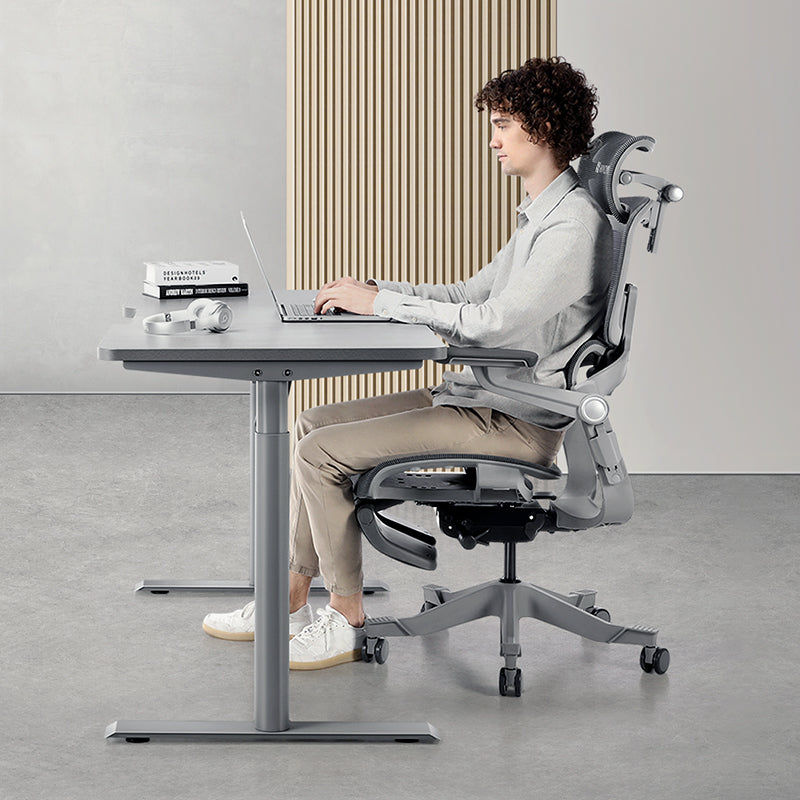


If you're petite, a chair fits you when it goes low enough and short enough, not when it has the longest feature list. Set four things in order: seat height, seat depth, lumbar height, then armrests. If your feet still don't rest flat, add a footrest instead of dropping the seat again. When you're choosing a chair, look first at the lowest seat height, the shortest seat depth and where the headrest sits, because those are the settings that most often don't suit a smaller frame.

Why does a "fully adjustable" chair still feel too big?
Often because "fully adjustable" means adjustable around an average-sized adult. When the lowest seat setting is still too high or the shortest seat is still too deep, you may start working around the chair without noticing.
Picture a 152 cm analyst on a run of back-to-back video calls. She's perched on the front edge of the seat so her feet can reach the floor, her back is nowhere near the backrest, and the armrests are lifting her shoulders towards her ears. Or a developer tucking his feet under the seat through a long debugging session because they'd dangle otherwise. Sound familiar?
Often that's a fit problem rather than a posture failure: the lumbar support is there, you just can't reach it.
The four settings that decide fit for a smaller frame
1. Seat height
Aim for thighs roughly level, lower legs roughly vertical and feet flat. Singapore General Hospital's office ergonomics guidance suggests a footrest when your feet can't reach the floor. That happens a lot for petite users, because a seat low enough for the floor often leaves the desk too high.
2. Seat depth
This one often catches people out. Sit all the way back and check the gap between the seat edge and the back of your knees: two to three fingers is about right. No gap? The seat's probably too deep for you, and you may lose contact with the lumbar support or feel pressure behind your knees.
3. Lumbar height
On a shorter back, the inward curve of your lower spine usually sits lower than it does on a tall colleague. Move the support down until it meets that curve, then adjust depth so the contact feels firm but gentle. Our guide to lumbar height vs depth walks through it step by step.
4. Armrests
Your elbows should hang close to your sides at roughly 90 degrees with your shoulders relaxed. If the armrests push your elbows outwards or your shoulders upwards, bring them in and down. If you can't get close enough to the desk, flip them up.
A five-minute setup order that stops you over-adjusting
Each step depends on the one before it, so don't skip around. Jump ahead and you may end up chasing one setting with another.
- Match the seat to your desk. Raise or lower it until your elbows sit level with, or just above, the desk surface.
- Check your feet. Not flat? Put a footrest under them and leave the seat where it is.
- Set seat depth. Sit fully back and slide the seat until you have that two- to three-finger gap.
- Place the lumbar support at the curve of your lower back, then set the depth so you feel held rather than pushed.
- Bring the armrests in. Lower and narrow them until your forearms rest lightly.
- Leave the headrest for last. On a shorter torso, one set too far forward can tip your chin down, so keep it just behind your head while typing. It earns its keep when you recline.
Then work a full session before touching anything. If something feels off, go back to the earliest step that might be wrong and change just that.
Dangling feet: footrest, footrest bar or leg rest?
These get mixed up all the time, but they don't do the same job.
- A floor footrest, like the Step footrest, sits under the desk and supports your feet while you work. It's usually the answer when the seat has to stay high.
- A built-in footrest bar is part of the chair itself and gives your feet another place to rest. The Q2 Pro has one. If your desk is very high, you may still want a floor footrest as well, so try both positions.
- A leg rest slides out from the front of the seat and supports your legs while you recline. It's for breaks, not typing.
Dropping the seat further only works if the desk is low too. Otherwise you may find yourself raising your shoulders to reach the desk.
Which Hinomi chair suits a petite frame?
Start with the Q2 Pro. Its positioning is "Softer Comfort, Petite-Friendly Fit", and the features back that up: a recommended height range of 150–185 cm, a lower seat height, a shorter seat depth and a lower headrest position. It adds a built-in footrest bar and a retractable leather leg rest, and both the seat and lumbar support are cushioned. If standard chairs leave your headrest pressing on the back of your skull, that lower headrest position is worth testing.
Then it's worth comparing two others. The H2 Pro ("Most Versatile Ergonomic Chair") covers 155–200 cm and has a wide adjustment range, including seat width and the inner width between the armrests, which can help with a narrower frame. The Q2 ("Best Value Ergonomic Chair") lists 160–180 cm and may suit you if you're 160 cm or taller.
| Q2 Pro | H2 Pro | Q2 | |
|---|---|---|---|
| Recommended height | 150–185 cm | 155–200 cm | 160–180 cm |
| Max weight | 125 kg | 150 kg | 125 kg |
| Seat | Cushioned; lower seat height, shorter seat depth | Velvet-textured mesh; 2.5° forward tilt; adjustable width | Cushioned; adjustable depth |
| Lumbar | Cushioned, height- and depth-adjustable | Auto-adapts up to 12°; height (3 cm) and depth (2.5 cm) adjustable | Dual-zone, height- and depth-adjustable |
| Headrest | 4D (height, depth, tilt, pad angle) with a lower position | 3D (depth, pivot, pad angle) | 4D (height, depth, tilt, pad angle) |
| Armrests | Flip-up, leather pads | BiPivot 5D, flip up 95° | Flip-up, leather pads |
| Feet and legs | Built-in footrest bar + retractable leather leg rest | Optional leather leg rest | Included plastic leg rest |
| Warranty (SG) | 3 years | 3 years mechanism + 8 years frame | 3 years |
| Price tier | Entry-mid | Mid-to-high | Entry |
"4D" just means the headrest moves four ways: up and down, forward and back, and two separate tilt angles. The chair comparison page has the full specs and current prices.
So how do you read this? From 150 cm to just under 155 cm, the Q2 Pro is the only one of the three whose listed range includes you, so it's the natural starting point. From 155 cm to just under 160 cm, the Q2 Pro and H2 Pro are both in range, and the choice comes down to feel: cushioned seat and lumbar on the Q2 Pro, or breathable mesh with more fine-tuning and a forward-tilting seat on the H2 Pro. Are you 160 cm or taller with a cushioned seat in mind? Then the Q2 joins the shortlist. (The X2 Pro also starts at 155 cm, but its wider seat and deeper seat adjustment are aimed at larger frames.)
Height is only a starting point. A long torso with short legs fits differently from the opposite build, so the seat-depth test settles it.
What to adjust first when something feels off
- Feet dangling or on tiptoe: add a footrest and keep the seat at desk height.
- Lower back tired: shorten the seat depth, then reset the lumbar height.
- Tight shoulders while typing: lower and narrow the armrests, and pull the keyboard closer.
- Sliding forward on the seat: sit fully back and recheck seat depth.
Petite in Singapore: dining-table desks, slippers and trying before you buy
A lot of home "desks" here are dining tables or built-in study ledges in HDB flats and condos, and they're rarely the right height for a smaller frame. Set the chair for the desk you've got, then sort out your feet with a footrest. If you're reworking the whole setup, a height-adjustable desk such as the S1 standing desk lets the desk come down to you.
Footwear matters more than you'd think. Many of us work barefoot or in slippers at home and in shoes at the office, and that changes your effective leg length. Set each chair up for how you actually sit there.
In a small room, a chair that can't tuck under the desk can leave you leaning forward, away from the lumbar support. Flip-up armrests help, and our small-space ergonomics guide has more ideas.
With 11.11 and Black Friday coming, it's tempting to order from a spec sheet. Try a few chairs first at our showroom at 12 Kallang Ave, #03-01, Aperia Mall (open daily 11am–8pm, near Lavender and Bendemeer MRT). Wear the shoes you use at your desk and ask the team to help you set seat depth and lumbar.
Questions we get a lot
What's the best Hinomi chair if I'm around 150–155 cm?
Start with the Q2 Pro. It's listed for 150–185 cm and has a lower seat height, shorter seat depth and lower headrest position, plus a built-in footrest bar. The H2 Pro starts at 155 cm, so it's worth comparing if you're at the top of that range. Proportions vary, so check the seat-depth gap behind your knees before you decide.
How can I tell if my office chair is too big for me?
Sit fully back against the backrest. If your feet can't rest flat, the seat edge presses into the back of your knees, or the lumbar support sits above the curve of your lower back, the chair is too big at its current settings. Shorten the seat depth and lower the lumbar first. If it still doesn't fit, the chair's range probably doesn't suit your frame.
Is the H2 Pro too big for petite users?
Not necessarily, and it's worth trying. Its recommended height starts at 155 cm, and you can adjust seat depth, seat width, lumbar height and depth, and the inner width between the armrests. Those are the settings a smaller frame relies on. Below 155 cm, the Q2 Pro is the better starting point. If your feet don't reach the floor, add a floor footrest.
Can I try Hinomi chairs in Singapore before buying?
Yes. The showroom is at 12 Kallang Ave, #03-01, Aperia Mall, open daily from 11am to 8pm and a short walk from Lavender MRT (Exit B) or Bendemeer MRT (Exit B). The team can help you set seat depth, lumbar and armrests for your height. If you want to check on a particular model first, WhatsApp +65 8670 9988 before you go.
What if the chair doesn't fit me after delivery?
Hinomi offers free delivery in Singapore and 30-day returns from the date you receive your order. Before you decide it doesn't fit, run through the five-minute setup in order and add a footrest if your feet don't reach the floor. Seat depth is often the first thing worth checking, and on many ergonomic chairs it's adjustable.
Your three-step plan
- Support your feet today. Set the seat to your desk, then put a footrest (or a sturdy box, for now) under your feet if they don't reach the floor.
- Shorten the seat depth. Get that two- to three-finger gap behind your knees so your back can actually reach the lumbar support.
- Bring the armrests in and down. Let your shoulders drop, then work a full session before you change anything else.
If your current chair simply won't go low or short enough, the Hinomi Q2 Pro was designed with smaller frames in mind. Compare it with the H2 Pro and Q2, read how chairs adapt to different body types, or drop by the Aperia Mall showroom and sit in a few before the sales start.