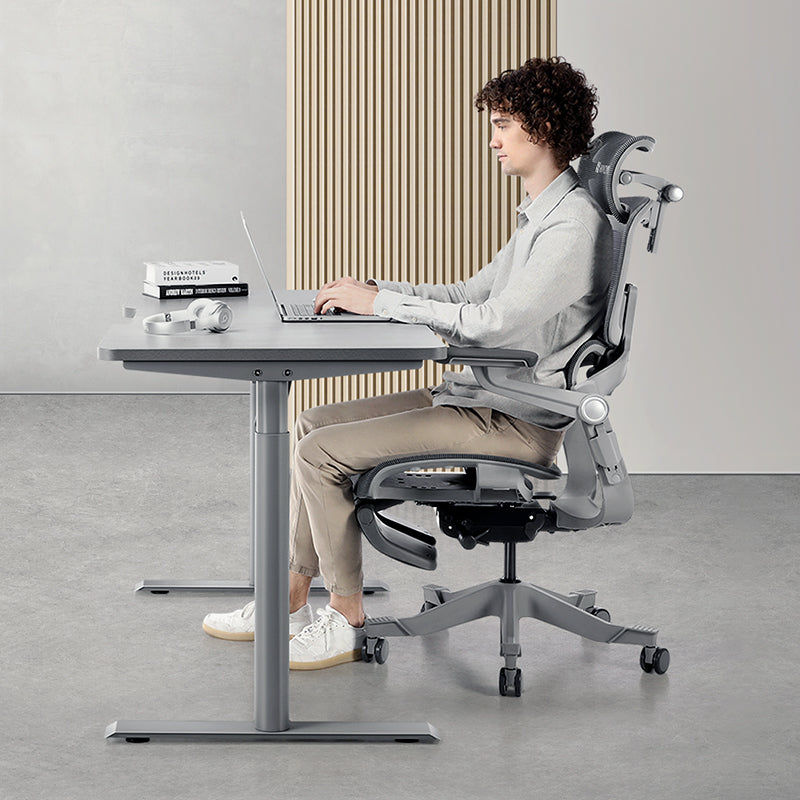


You can keep good posture in a small room, and it doesn't take the biggest chair you can squeeze in. It takes a chair that fits your body and a layout that lets you slide into a supported position (and back out of it) without a fight. Set up seat height, seat depth, lumbar support and armrests once, make sure the chair can get close to the desk, and make the daily switch from "work mode" to "room mode" quick enough that you'll actually do it.
That last part is where most compact setups fall apart. Ever worked with the chair half-wedged under the desk because the wardrobe door needed to open? You'll know what we mean.
Why small rooms quietly wear down your posture
In an office, the desk, chair and monitor stay put. At home in a common bedroom, the desk's pushed against a wall and the chair rolls aside whenever someone needs the wardrobe. Nothing stays where you left it.
So the useful question isn't only whether a chair has good lumbar support. It's whether you can get into a supported position easily enough to do it every day. When that's awkward, you compensate. You perch on the front edge of the seat. You twist to reach the mouse. You type with the chair parked a hand's width too far back because the armrests hit the desk. Sound familiar?
So you're really solving two things: body fit (seat height, seat depth, lumbar position, arm support) and space behaviour (how close the chair gets to the desk, how quickly it tucks away, whether the armrests move when they're in the way). You'll need both.
Four clearances to check before you blame the chair
You won't need a tape measure. Sit in your normal working position and check these.
- Knee room under the desk. If your knees bump a drawer unit or the desk frame, you'll drift forward onto the front of the seat and away from the backrest.
- Approach distance. With your hands on the keyboard, your elbows should rest close to your sides. Armrests that stop you short mean reaching from the shoulder all afternoon.
- Space behind you. You need room to lean back a little during calls and to stand up without squeezing out sideways past the bed.
- Elbow room at the sides. A wall or bed frame pressing in from one side restricts your arm and makes the chair's own levers harder to reach.
If one's compromised, your body will work around it. Sort the clearance out first. It's often a five-minute job.

Which chair features actually earn their space?
Three features matter more here than almost anywhere else. Flip-up armrests let you slide right up to a shallow desk. A foldable frame gives floor space back. And leg or foot support, if you want it, shouldn't stick out into the walkway.
Here's how the current Hinomi range compares. (The "D" number simply counts the directions an armrest adjusts in, so 4D armrests move in height, width, depth and angle.) Full specs are on the chair comparison page.
| Chair | Armrests | Flip up? | Leg and foot support |
|---|---|---|---|
| H2 Pro | BiPivot 5D, pivoting on two axes | Yes, up to 95° | Optional leather leg rest |
| Q2 Pro | Leather pads | Yes | Retractable leather leg rest and a built-in footrest bar |
| Q2 | Leather pads | Yes | Included plastic leg rest |
| H2 Classic | 4D: height, width, depth and angle | No | No leg rest; heel-rest surfaces on the base |
| X2 Pro | BiPivot 6D with 360° rotation, leather pads | No | Included leather leg rest |
If your room switches between office and bedroom every day, the H2 Pro is the most practical fit in the range. Its armrests flip up 95° so you can sit in close, and it's built around a foldable frame that'll store under a compatible desk when there's enough clearance.
Petite users often have it hardest in small rooms. Desks are set for average heights, and a seat that's too deep pushes you to perch. The Q2 Pro has a lower seat height, a shorter seat depth and a lower headrest position, plus flip-up armrests and a built-in footrest bar for when the desk forces your seat up. Its leg rest is retractable, so it isn't eating floor space when you're not using it. If you're near the top of its 150–185 cm range, it's worth comparing the H2 Pro too.
The Q2 also has flip-up armrests and covers the core adjustments at an accessible, entry-level price. The H2 Classic and X2 Pro don't flip up, so check that the armrests clear your desk edge, but both suit a small room that stays a dedicated study. Tall or broad? The X2 Pro's wider seat and generous armrest spacing are worth a look, though you'll still want to check you're within its 150 kg weight limit.
Setting up a small-room workstation in ten minutes
Give it about ten minutes the first time. After that, getting back into position should take well under a minute.
- Pick two spots. Spot A is where the chair lives while you work. Spot B is where it goes when the room's needed for something else.
- Dial in your fit at Spot A. Set seat height so your feet rest flat on the floor (or on a footrest if the desk's on the high side). Leave a two-to-three-finger gap behind your knees. Bring the lumbar support into the curve of your lower back, set the armrests so your shoulders can relax, then pull the keyboard and mouse in close.
- Try the move to Spot B. Roll, fold or tuck the chair away. If you have to lift it or force it past the bed, change the layout or the parking spot.
- Come back and check. If every return means redoing three levers, you'll be skipping it within a week.
That's the trap with compact rooms: a setup can be correct and still fail because it's a hassle. You stop flipping the armrests. You work wherever the chair lands. A strip of floor tape marking Spot A helps more than you'd expect. For the core adjustments, our guide on how ergonomic furniture helps your posture goes through each one.
Shallow desks and the slow lean forward
Picture a data analyst who's working through a long model on a 60 cm deep desk beside the bed. The armrests hit the desk frame, the chair stops 15 cm short, and two hours later she's typing with her arms stretched out and her shoulders creeping up. It's a very common small-room problem.
Flip the armrests up or swing them aside so the chair can come in fully. Then free up desk depth: a monitor arm lets the screen sit further back instead of crowding the keyboard.
Small rooms also pull you towards the screen, lifting your back off the lumbar support. The H2 Pro and X2 Pro both have a seat that tilts 2.5° forward, and the H2 Pro's upper backrest tilts 10° forward too, so your back stays supported while you lean in to check a dense spreadsheet or review a pull request.
Working from an HDB flat or condo
Plenty of Singapore home offices live in the common bedroom or study of an HDB flat or condo. A few local realities are worth planning for.
- Size the desk for the room, not the showroom. The S1 standing desk comes in S (100 x 60 cm), M (120 x 70 cm), L (140 x 70 cm) and XL (160 x 70 cm). In a tight study, S or M usually leaves room for the chair to roll back. Standing for part of the day doesn't need extra floor either; see how to choose a standing desk.
- Shared bedrooms need quiet resets. If your partner's asleep while you're on a late call, a rumbling chair is a problem. Silent replacement wheels and a chair floor mat keep things quieter and protect vinyl or parquet floors.
- Plan for the heat. Small rooms warm up fast on Singapore afternoons, and when you're hot you tend to perch forward and fidget. Leave space for a fan by the desk.
Singapore's Workplace Safety and Health Council points to SS 514, the Code of Practice for office ergonomics, in its overview of workplace ergonomics, and the principles apply at home too. If you'd rather not assemble a chair in a cramped room, onsite assembly is available on top of free delivery in Singapore.
How can you tell it's working?
You switch room modes in under a minute. You sit back into position with little re-adjustment. Those are the good signs. The warning signs: you avoid sitting fully back, one arm works unsupported most of the day, or you've stopped using the chair's adjustments. That's usually layout friction, not the chair.
If lower back discomfort is already building through your day, our guide to lower back pain after long sitting covers what to adjust first. A better layout isn't a substitute for proper advice.
Questions we get a lot
Will a full-size ergonomic chair fit in an HDB common bedroom?
It can, but measure first rather than assume. Check the knee room and height under your desk, the space behind the desk to roll the chair back and stand up, and the room you'll need to recline without hitting the bed or wardrobe. Then compare those numbers with the chair's dimensions on its product page. Flip-up armrests help a chair sit closer to a compact desk, and the H2 Pro's foldable frame can store under a desk with enough clearance.
Can I try a chair in Singapore before buying?
Yes. You can sit in Hinomi chairs at the Hinomi showroom at 12 Kallang Ave, #03-01, Aperia Mall, open daily from 11am to 8pm and close to Lavender and Bendemeer MRT. Staff can help with fitting advice, so it's worth bringing rough measurements of your desk and room. Purchases also come with 30-day returns from the date you receive them.
Which chair suits a petite person working in a small room?
Start with the Q2 Pro. Its lower seat height and shorter seat depth help you sit back against the backrest with your feet supported, the footrest bar helps when the desk is on the high side, and the retractable leg rest stays out of the walkway. If you're towards the top of its height range, compare the H2 Pro as well.
Which desk size works for a small study room in Singapore?
Measure the floor you can spare, and don't forget room behind the desk to roll the chair back and stand up. In many compact HDB and condo studies, the S1 in S (100 x 60 cm) or M (120 x 70 cm) is plenty for a laptop or a single monitor. The L or XL sizes suit dual screens in a larger room.
Your three-step plan
- Check the four clearances. Free up knee room and approach distance first so the chair can come in close. It costs nothing and it's often the quickest win.
- Set your fit once, then mark the spot. Seat height, seat depth, lumbar and armrests, then a strip of tape on the floor so returning takes seconds.
- Time your daily switch. Clear the room and come back with a stopwatch running. If it's taking more than a minute, find the slowest step and simplify it.
Choosing a chair for a room that has to do two jobs? The H2 Pro, our Most Versatile Ergonomic Chair, is a sensible place to start because of its flip-up armrests and foldable frame. You can weigh it against the rest of the range on the chair comparison page, try chairs at the Aperia Mall showroom, or browse more layout ideas in our home office setup tips.