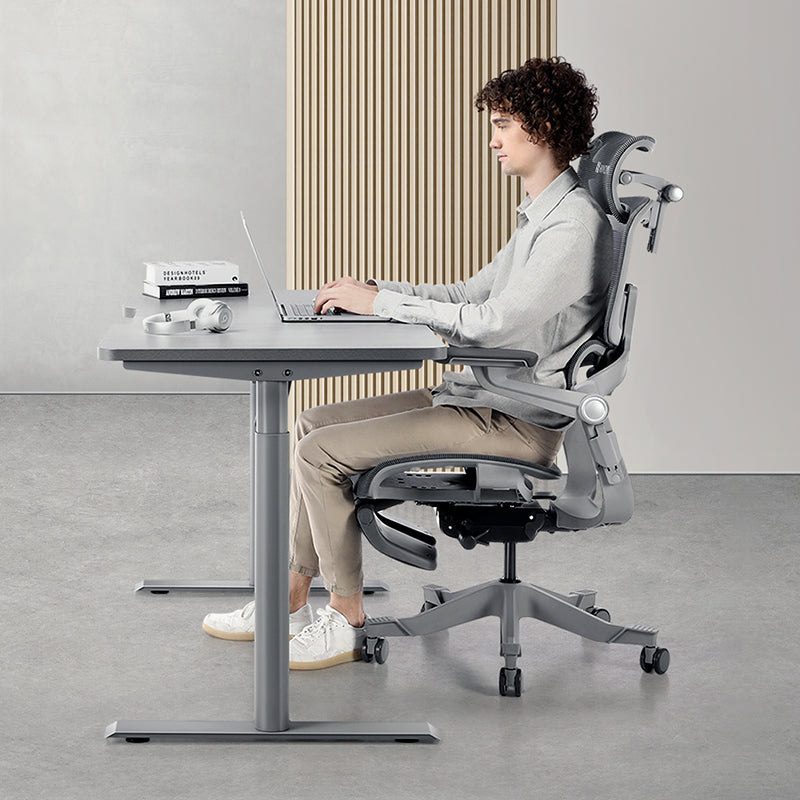


You can check your workspace in about five minutes by looking at three things: your chair, where your desk and screen sit, and how long you stay put without moving. Go through the checklist below, tick every warning sign that applies, then see where the ticks cluster. It's an informal checklist rather than a validated score, but it'll point you to a sensible place to start. For many people that's the chair or the screen height.
Why bother checking your setup?
If you work at a desk, you probably spend more waking hours in your office chair than anywhere else. Yet plenty of us pick a chair with less care than a new phone. And when a stiff neck or an afternoon slump turns up, the workspace isn't usually the first thing we suspect.
It's worth a closer look, though. An occupational therapy study at Singapore General Hospital found that 73% of 324 office workers surveyed reported pain in at least one body part, most often the neck, shoulders and lower back. The researchers commonly saw raised shoulders, bent or twisted necks and backs, and people perched on the edge of their seats with no back support. Sound familiar?
You're not aiming for perfection here. You're trying to see clearly what's off, so you know where to begin. Grab a pen and be honest.
The checklist
Every item's a warning sign. Give yourself one tick for each that applies. One exception: if your chair wobbles, feels unstable or the seat sinks on its own, sort that out first, whatever else you tick.

Part 1: Your chair (2 minutes)
Stand up and look at your chair properly, then sit back down the way you usually do.
How it feels
- Your back aches after two or more hours of sitting.
- You sit forward, away from the backrest, or your lower back feels unsupported.
- Getting comfortable means shifting position again and again.
- By the end of the day, your hips or tailbone ache.
- Your neck or upper back feels strained.
What it can do
- There's no lumbar support, or it can't be adjusted.
- Seat depth is fixed, so the edge presses into the back of your knees or leaves your thighs unsupported.
- Armrests won't reach elbow height.
- The backrest doesn't recline, or it reclines with no way to control it.
- Cushion or mesh has sagged and no longer feels supportive.
Condition
- It's been in daily use for years and is showing its age.
- Upholstery is torn, stained or worn through.
- Levers stick, or the seat slowly sinks during the day.
- It wobbles or feels unstable.

Part 2: Desk and screen (2 minutes)
Sit at your desk as you'd normally be, mid-task.
Position
- Your feet don't rest flat on the floor or a footrest.
- When you type, your elbows sit well above or below desk height rather than at roughly 90°.
- The screen is much closer or further than about an arm's length.
- You look down to read, because the top of the screen sits well below eye level.
- Wrists bend up, down or sideways while you type.
Workspace
- You crane your neck forward to read.
- Your shoulders lift because the keyboard's too high.
- Reaching the mouse means leaning forward.
- Clutter, cables or a small desk push you into awkward positions.
- Your screen sits off to one side, so you twist to see it.
Use SingHealth's office ergonomics guidance as your benchmark here: the top of the screen at or slightly below eye level, about an arm's length away and directly in front of you, with straight wrists while typing.
Part 3: Movement habits (1 minute)
Think about a typical workday. When did you last stand up, honestly?
- You often sit for two hours or more without getting up.
- Most afternoons bring an energy slump.
- Standing up after a long sit feels stiff.
- Your legs feel heavy or puffy by evening.
- Holding a comfortable posture all the way through the day feels hard.
Three or more ticks in this part suggest it's worth looking at how long you sit, not just how you sit.
How to read your ticks
This is an informal checklist, not a validated risk score, so there's no "safe" total. Use it like this:
- Safety first. A chair that wobbles, feels unstable or sinks on its own comes before everything else, even if it's your only tick.
- Compare shares, not raw counts. The parts are different sizes: 14 items for the chair, 10 for the desk and screen, and 5 for movement. Three of the five movement items is a bigger share than five of the 14 chair items, so look at how much of each part you ticked.
- Pick one or two changes. Start with the part where the biggest share applies, and note the rest for your next check.
- Don't let a low total talk you out of a real ache. If something hurts and keeps coming back, it deserves attention whatever your count.
Where should you start?

Start with the part where the biggest share of items applied to you.
Mostly seating. Start with the chair. It's where the other adjustments start. You'll want adjustable lumbar support, seat depth adjustment and armrests that reach elbow height at the very least. If your chair can't do those things, desk tweaks may not fully make up for it.
Mostly desk and screen. Your chair may be fine, but the screen or keyboard may be pulling you out of position. Raise the screen (a monitor arm makes height and distance easy to fine-tune), bring the keyboard and mouse closer, and aim for a desk just below elbow height. Feet not reaching the floor once the chair's at the right height? Add a footrest.
Mostly movement. It's worth breaking up long stretches of sitting. SingHealth's guidance suggests a break from sitting every 30 minutes, so set a reminder and don't snooze it. A height-adjustable desk lets you switch between sitting and standing without stopping work. Our guide on how often you should stand up has practical routines, and planned recline breaks add some variety between them, though they don't replace getting up.
What you notice, and what to check first
| What you notice | Worth checking | Check first |
|---|---|---|
| Neck craning forward | Screen too low or too far away | Raise the screen to eye level, about an arm's length away |
| Hunched, raised shoulders | Desk or keyboard too high, no arm support | Raise the chair (with a footrest if needed) or lower the desk; set armrests to elbow height |
| Leaning forward all day | Screen too far, no lumbar contact | Move the screen closer; adjust lumbar support and seat depth |
| Wrists bent while typing | Keyboard or mouse at the wrong height | Keep wrists straight; bring the mouse in line with the keyboard |
| Lower back ache | Unsupported lower back, long static sitting | Lumbar position and seat depth, then breaks (see our guide to lower back discomfort after long sitting) |
Working from home in Singapore: where ticks pile up
Plenty of people here split the week between an office workstation and a home setup in an HDB flat or condo. Which one collects more ticks for you?
- Dining-table offices. Dining chairs are made for meals, not eight-hour days of spreadsheets and calls. They don't adjust, and neither does the table, so Part 1 may collect a lot of ticks.
- Laptop-only work. If you're peering down at a laptop on the dining table like it's a book in your lap, the screen's too low. A laptop stand with a separate keyboard and mouse, or an external monitor on an arm, can be one of the most useful changes you make.
- Compact study rooms. In a small spare room, pick a desk that leaves space to push back and stand up comfortably. Our small-space ergonomics guide covers layouts for tight rooms.
- Humid afternoons. With the air-con off, a foam-backed chair can feel sticky by mid-afternoon, and you may find yourself sitting away from the backrest. A breathable mesh back may make it easier to stay in contact.
- Hot-desking. Shared chairs carry someone else's settings. Run through Parts 1 and 2 whenever you sit at a new desk. It takes under two minutes.
What to change, area by area
Start with what you've already got. Set seat height, lumbar position and screen height properly before buying anything; it's free, and it'll show you how far your current chair can go. Books under a laptop, a rolled towel at your lower back and a 30-minute timer are all fair game.
If the chair turns out to be the limit (no adjustable lumbar, a fixed seat depth, armrests that won't reach), a new chair may be the most useful change. In Hinomi's range, the Q2 is our "Best Value Ergonomic Chair", with lumbar support adjustable in height and depth and a leg rest included. If you're on the shorter side, start with the Q2 Pro: it has a lower seat height, shorter seat depth, a lower headrest position and a built-in footrest bar. If you're taller or broader, look at the X2 Pro first and compare it with the H2 Pro. Both suit heights of 155–200 cm with a 150 kg weight limit, and it's worth checking that limit for any chair you're considering.
If your ticks were mostly in Part 2, a monitor arm and a closer keyboard may do more than a new chair. Mostly Part 3? A sit-stand desk or a firm break routine might be the missing piece.
Change one or two things at a time and repeat the checklist after two weeks. If fewer items apply and the workday feels easier to get through, the changes suit you.
Frequently asked questions
How often should I repeat this ergonomic assessment?
Repeat it two weeks after any change to your chair, desk or screen, so you can see whether the change made a difference. After that, a quick check every few months is plenty, or whenever you move desks, start a new job or notice new aches.
Is this a substitute for a professional assessment?
No. It's a self-check for spotting common setup problems. In Singapore, employers can also include workstation checks as part of their workplace safety and health risk management, so it's worth asking your HR team.
What's the most common problem people find?
In the SGH study above, researchers commonly saw raised shoulders, a lot of bending and twisting of the neck and back, and people sitting at the edge of their chairs without back support. At home, two of the first things worth checking are a laptop screen sitting too low and a chair without adjustable lumbar support or seat depth.
My home office is a corner of an HDB flat. What matters most?
Prioritise the chair and the screen height. A supportive, adjustable chair and a screen at eye level cover a lot of the items in this checklist and don't take up much floor space. In a tight room, a compact desk and a monitor arm, which frees up desktop space, can make the corner easier to work in.
Can I get help setting up a chair in Singapore?
Yes. At the Hinomi showroom at 12 Kallang Avenue, #03-01 Aperia Mall, near Lavender and Bendemeer MRT, you can try different chairs and staff will help you adjust them to your height. It's open daily from 11am to 8pm. Onsite assembly is also available as a paid add-on when you order online.
Your next three steps
- Start where the biggest share applied. Note the rest for your next check rather than changing everything at once, but don't put off a wobbly chair or an ache that keeps coming back.
- Make the free changes today. Set seat height and lumbar position, raise your screen to eye level, pull the keyboard and mouse closer, and set a 30-minute stand-up reminder.
- Check again in two weeks. Note which ticks have gone and which are left. Whatever's left is what you'll look at next.
If the chair turns out to be what's holding you back, the chair comparison page sets out what each Hinomi model adjusts, and you're welcome to bring your checklist to the Aperia Mall showroom and try them in person.